Some IPTV apps are smooth, effortless, the kind you set up and forget—others? A complete nightmare. You don’t want lag, buggy navigation, or hours wasted troubleshooting broken playlists. You want precision. Speed. Simplicity. But which one delivers?
Enter Smart IPTV vs IPTV Smarters—two names thrown around like they’re equals. But they’re not. One is a raw, stripped-down IPTV beast, the other a feature-stacked machine that’s either brilliant or bloated, depending on who you ask.
This isn’t your typical comparison. This is an all-out analysis—no fluff, no sugarcoating, just facts. One of these apps dominates, the other? You might as well toss it.
IPTV Heavyweights: The Core Breakdown
Table of Contents
Smart IPTV: The No-BS Workhorse
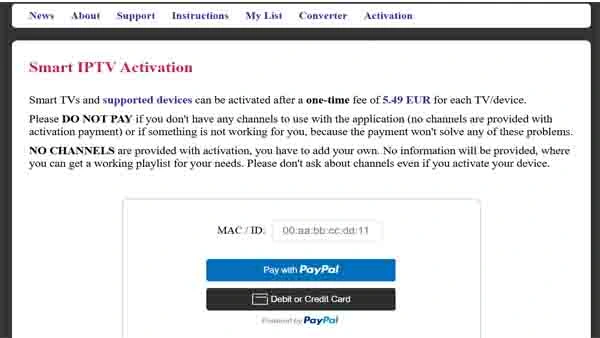
Smart IPTV doesn’t hold your hand. You either know what you’re doing or you’re lost. It’s an IPTV player, nothing more. No flashy menus, no pre-loaded content—just a shell waiting for you to feed it M3U links. You pay once, own it forever, and if you can handle the setup? It’s rock solid.
🔥 What It Does Right:
✔ One-time fee—no sneaky subscriptions
✔ Works natively on Smart TVs (Samsung, LG)
✔ Minimalist, no resource drain
❌ Where It Falls Apart:
✖ Manual setup—not beginner-friendly
✖ No built-in IPTV content—you bring your own
✖ Limited updates, slow customer support
IPTV Smarters: The Swiss Army Knife of IPTV
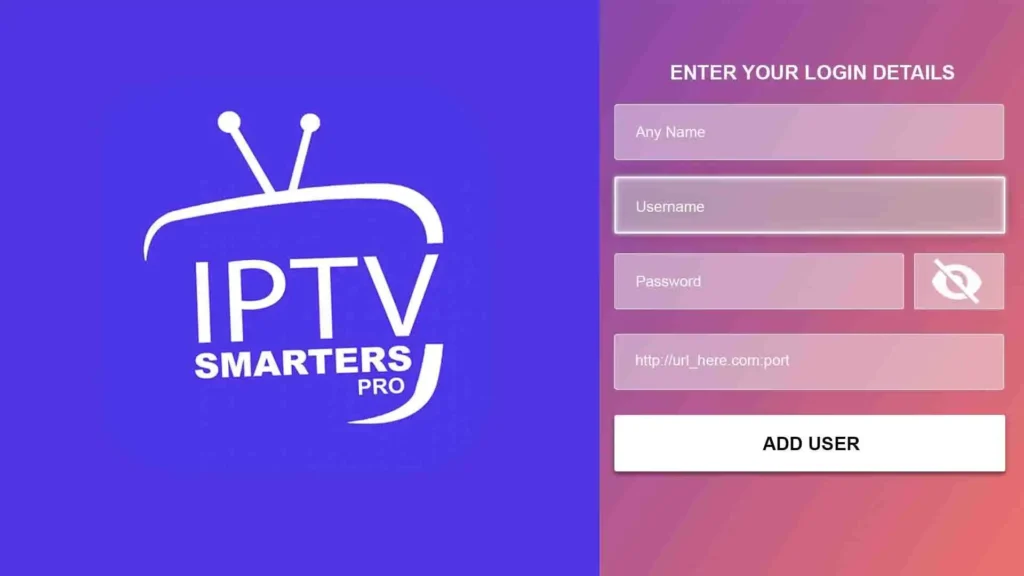
If Smart IPTV is a tool, IPTV Smarters is an entire toolkit. It’s not just a player—it’s a full-blown IPTV experience. Live TV, Video on Demand, Catch-Up, EPGs, parental controls, multi-screen viewing—this thing is loaded. Plus, unlike Smart IPTV, you can log in via Xtream Codes API, skipping the hassle of manually uploading playlists.
🔥 Where It Shines:
✔ Xtream Codes API support—no manual playlist uploads
✔ Multi-screen support—watch multiple streams at once
✔ Built-in VPN integration for privacy
✔ Cross-platform: Android, iOS, Windows, macOS, Firestick
❌ Where It Stumbles:
✖ Pro version required for premium features
✖ Slight learning curve for first-time users
Ease of Use: The Make-or-Break Factor
Let’s get real. No one wants to waste time trying to figure out why their IPTV won’t load. Setup should be smooth, simple, and frustration-free.
Smart IPTV? Nope. You have to upload your own M3U files manually, and if something doesn’t work? You’re on your own. It’s fine if you’re an IPTV veteran, but for casual users? It’s a pain.
IPTV Smarters? A game-changer. It automates the process. You just enter your IPTV provider’s login credentials (Xtream Codes API), and boom—you’re watching in seconds. No M3U files, no headaches, just pure IPTV bliss.
🏆 Winner: IPTV Smarters
No competition. IPTV Smarters crushes Smart IPTV in ease of use. Faster setup, fewer headaches, and a smoother experience overall. If you hate tech frustration, go with Smarters.
Features & Functionality: Which IPTV App Gives You More?
A good IPTV app isn’t just about playing streams—it’s about how much control, flexibility, and customization you get. And this is where the real battle lines are drawn.
Smart IPTV: The Barebones Machine
Smart IPTV doesn’t do bells and whistles. It plays IPTV and does it well. But don’t expect fancy menus, extra features, or anything beyond a basic media player experience.
🔥 What You Get:
- M3U & XML playlist support—if you have the link, it works.
- EPG (Electronic Program Guide) support—so you can see what’s playing.
- One-time activation—no recurring fees.
❌ What’s Missing:
- No Catch-Up TV—if you miss a show, too bad.
- No multi-screen viewing—one stream at a time, that’s it.
- No built-in VPN—if you want privacy, get one yourself.
IPTV Smarters: The Feature Overlord
IPTV Smarters throws everything at you—Live TV, Catch-Up, Multi-Screen, even an in-app VPN for secure streaming. It’s not just an IPTV player—it’s an IPTV control center.
🔥 What You Get:
- Multi-screen support—watch four streams at once.
- Built-in VPN—keep your viewing private.
- VOD & Catch-Up TV—rewind, pause, replay, no worries.
- Parental Controls—lock adult content with a PIN.
- Xtream Codes API login—skip the manual playlist hassle.
❌ What’s Missing:
- Some features require Pro version—not everything is free.
- Heavier app—might not run as smoothly on older devices.
🏆 Verdict: IPTV Smarters annihilates Smart IPTV in features. If you want raw power and customization, it’s the clear winner.
Device Compatibility: Where Can You Use Each App?
Your IPTV app is only useful if it works on the devices you actually use. Smart TVs, mobile phones, PCs, Firesticks—where do these two stack up?
Smart IPTV: The Smart TV Specialist
Smart IPTV excels on Smart TVs—it’s designed to be a native player for Samsung, LG, and Android TVs. But that’s also its biggest limitation. If you want to use it on a phone, tablet, or PC? Good luck.
✅ Works on:
- Samsung & LG Smart TVs
- Firestick (side-loaded, not official app store)
- Android TV
❌ Doesn’t Work on:
- iPhones & iPads
- Windows & Mac
IPTV Smarters: The Universal App
IPTV Smarters wins on sheer availability. It works everywhere—phones, tablets, PCs, Smart TVs, Firesticks. Whether you want IPTV on the go or on a big screen, this app delivers.
✅ Works on:
- Android & iOS (phones + tablets)
- Windows & Mac
- Firestick & Android TV
- Samsung & LG Smart TVs
🏆 Verdict: IPTV Smarters obliterates Smart IPTV in compatibility. More platforms, more flexibility. No contest.
Pricing & Costs: Which IPTV App Gives You Better Value?
Smart IPTV: The Pay-Once Model
Smart IPTV keeps things simple: one-time payment, no subscriptions.
💰 Price: €5.49 (per device)
💰 Hidden Fees? None.
If you don’t want to pay monthly for an IPTV player, this is the better deal. But remember—you get what you pay for (and not much more).
IPTV Smarters: Free, But With a Catch
IPTV Smarters is free to download, but some features are locked behind a Pro version.
💰 Price: Free (basic version) / Paid (Pro features)
💰 Hidden Fees? Pro version required for multi-screen, VPN, and advanced features.
🏆 Verdict: If you want a free IPTV player, Smarters wins. But if you prefer a one-time payment with no Pro upsells, Smart IPTV is the better choice.
Streaming Performance: Which IPTV App Delivers the Smoothest Experience?
Performance is king. You don’t care about flashy menus if the stream lags, buffers, or straight-up crashes mid-game or in the middle of a movie. Speed. Stability. No nonsense. That’s what matters.
Smart IPTV: A Lean, Mean Streaming Machine
Smart IPTV doesn’t try to impress with fancy visuals or extra features—it just plays your IPTV content. No unnecessary bloat running in the background, no heavy system load. If your playlist is solid, it runs smooth as silk, even on older Smart TVs.
🔥 Where It Wins:
✔ Runs like a feather—low CPU, low RAM, low risk of freezing.
✔ Excellent for Smart TVs—it’s built for them.
✔ Full HD & 4K?—Handled like a pro (assuming your IPTV provider isn’t garbage).
❌ Where It Struggles:
✖ No buffering controls—if your stream buffers, too bad, fix your provider.
✖ Not optimized for mobile or PC—Smart TVs? Perfect. Anything else? Clunky.
IPTV Smarters: The Powerhouse (If Your Device Can Handle It)
IPTV Smarters is a monster—more features, more background tasks, more ways to tweak performance. But all that power? It comes at a cost. If your device is weak, it chokes.
🔥 Where It Wins:
✔ Adjustable buffer settings—reduce lag manually.
✔ Auto-reconnect—no more sudden dropouts.
✔ Best for mobile & PC—but Smart TV performance varies.
❌ Where It Struggles:
✖ Heavy on system resources—your Firestick might wheeze.
✖ Multi-screen support drains power—use it wisely.
🏆 Verdict:
- Got a Smart TV? Smart IPTV wins—it’s lighter, faster, smoother.
- Using IPTV on mobile, PC, or need buffer controls? IPTV Smarters takes the crown.
Security & Privacy: Which IPTV App Protects You More?
You might not think about it, but streaming IPTV without protection is risky. Some providers are shady, some ISPs throttle IPTV traffic, and if your government hates IPTV, you could be on their radar. So which app keeps you safer?
Smart IPTV: Security? What Security?
Smart IPTV doesn’t track you, spy on you, or store your data—that’s a plus. But it also doesn’t protect you. If your ISP is watching, they’ll see everything you stream.
❌ Where It Fails:
✖ No VPN support—you’ll need an external one.
✖ No encryption, no stealth modes—wide open.
✖ ISP tracking risk—if your IPTV provider is flagged, your connection might be too.
IPTV Smarters: Built-in Defense System
IPTV Smarters steps up with built-in VPN integration—meaning you can hide your activity without using a separate VPN app. This is a game-changer for privacy-focused users.
🔥 Where It Wins:
✔ Direct VPN integration—turn it on inside the app.
✔ Xtream Codes login hides manual playlist links.
✔ More privacy settings than Smart IPTV.
🏆 Verdict:
- Privacy matters? IPTV Smarters is your best bet.
- Already using an external VPN? Smart IPTV is fine.
User Experience & Customization: Which App Feels Better to Use?
Some people want a clean, simple interface that just plays IPTV. Others want full customization, themes, tweaks, and advanced settings. Which app delivers?
Smart IPTV: No Distractions, No Gimmicks
Smart IPTV is barebones—upload a playlist, pick a channel, watch TV. No pop-ups, no flashy buttons, just IPTV.
🔥 Where It Wins:
✔ Minimalist and clean—zero clutter.
✔ Easy navigation on Smart TVs.
✔ No unnecessary menus or distractions.
❌ Where It Fails:
✖ Zero customization—you use it the way it was designed.
✖ Feels outdated—compared to newer IPTV apps.
IPTV Smarters: The Customization King
IPTV Smarters is flashy, modern, and built for control freaks. You can change layouts, tweak colors, enable dark mode, and set up custom EPG options. It’s IPTV, your way.
🔥 Where It Wins:
✔ Custom themes & layouts—make it look how you want.
✔ Smoother dashboard—easier on mobile & PC.
✔ Advanced playlist management—rename, organize, and sort channels.
❌ Where It Fails:
✖ Might feel overwhelming—too many options for casual users.
✖ Some UI features locked behind Pro version.
🏆 Verdict:
- Want simplicity? Smart IPTV is your go-to.
- Want customization & a modern UI? IPTV Smarters dominates.
Smart IPTV vs. IPTV Smarters: The Final Showdown—Who Wins?
The dust has settled, and it’s time to separate the legend from the overhyped. Smart IPTV and IPTV Smarters—two of the biggest names in IPTV streaming—but only one will fit your needs like a glove. Some want simplicity, reliability, and zero nonsense, while others crave cutting-edge features, customization, and ultimate control.
This is the final verdict—no fluff, no empty praise, just brutal, fact-driven conclusions.
Legal Considerations: Are You Playing It Safe?
Here’s the deal—neither Smart IPTV nor IPTV Smarters comes preloaded with channels. They’re just media players. But that doesn’t mean you’re in the clear.
Smart IPTV: Safe… As Long As You Are
This app stays in its lane. It doesn’t provide access to any IPTV services; it just reads M3U links you upload. If your IPTV provider is legal, you’re golden. If not? That’s on you.
✔ Doesn’t host or provide illegal streams.
✔ Safe to use if you have a legit IPTV source.
❌ No way to verify the legality of your provider.
IPTV Smarters: More Features, More Risk?
IPTV Smarters goes a step further—it supports Xtream Codes API login, which means you don’t always have to manually upload an M3U file. But here’s the kicker—some IPTV services accessed this way operate in gray areas.
✔ No preloaded content, just a media player.
✔ API login makes setup easier, but also makes shady services easier to access.
❌ More scrutiny since Xtream Codes has been targeted legally in the past.
🏆 Verdict:
Neither app is illegal, but what you stream could be. Stick to legitimate IPTV services, and always use a VPN to keep your activity private.
Which IPTV App Should You Choose?
Now, the real decision-making begins. You’ve seen their strengths, their flaws, and their hidden quirks. But which one should you actually download and use?
Pick Smart IPTV If…
✅ You want simplicity. Just upload a playlist and go.
✅ You use a Smart TV (Samsung, LG, Android TV)—this app was made for them.
✅ You prefer a one-time payment instead of subscription-based fees.
✅ You don’t need fancy extras like multi-screen or built-in VPNs.
Pick IPTV Smarters If…
✅ You want more features, more flexibility. Live TV, VOD, Catch-Up, EPG—it’s all here.
✅ You prefer Xtream Codes API login instead of manually handling M3U playlists.
✅ You want built-in VPN support to protect your privacy.
✅ You need IPTV on multiple devices (mobile, PC, Smart TV, Firestick).
🏆 Final Answer? IPTV Smarters takes the crown for feature-packed power, but Smart IPTV dominates for stability on Smart TVs.
FAQs: Rapid-Fire Answers to Common Questions
❓ Is Smart IPTV free?
No, it requires a one-time activation fee (€5.49 per device).
❓ Is IPTV Smarters free?
Yes, but Pro features require an upgrade.
❓ Which app is better for Android?
IPTV Smarters—it’s designed with mobile and PC users in mind.
❓ Which app is better for Smart TVs?
Smart IPTV—lighter, faster, optimized for big screens.
❓ Do I need a VPN for IPTV?
Yes. If you’re using IPTV services that aren’t officially licensed, your ISP could block or monitor your activity.
❓ Can I install these apps on Firestick?
Yes, both work, but IPTV Smarters is better optimized for Firestick.
Final Thoughts: The Last Word on Smart IPTV vs. IPTV Smarters
Here’s the no-BS breakdown:
- If you want a plug-and-play IPTV experience on your Smart TV, go with Smart IPTV.
- If you want a modern, feature-packed IPTV player across multiple devices, IPTV Smarters is the clear winner.
At the end of the day, both apps have their place. Just pick the one that fits your needs, set it up properly, and enjoy streaming without headaches, buffering, or unnecessary complexity.
Now go enjoy your IPTV. 🚀🔥